Contract Versioning
Smart contract development is inherently iterative. As you build, test, and refine a contract, its source code and bytecode change over time, and each change may be deployed multiple times for testing or validation. Stagenets version contracts in linked repositories according to this workflow.
Contract Workspaces
When you connect a GitHub repository to your Stagenet, each smart contract in the repository is assigned its own dedicated Contract Workspace.
- The Workspace is identified by the contract’s unique name.
- For example, a
StakingVaultcontract in the linked repository will have a Workspace named StakingVault.
A Contract Workspace acts as the long-lived home for that contract across its development lifecycle.
Contract Versions
As a contract evolves, the Stagenet tracks each distinct version of its code as a Contract Version.
- A Contract Version corresponds to a specific contract bytecode. Typically, this is a from a new version Solidity file at a specific Git commit.
- When a GitHub repository is first linked to a Stagenet, an initial Contract Version is created for each contract, representing its state at the time of linking.
- Each time a contract with the same name but different on-chain bytecode is pushed to the linked repository, a new Contract Version is created within that contract’s Workspace.
For example:
- You push an initial version of StakingVault.sol
- You later modify the logic and push an updated version
- Each push creates a new Contract Version under the StakingVault Workspace
Contract Versions represent what the contract code is at a point in time. Your can view all the Versions of a contract in the History section in its Workspace.
Contract Deployments
A Contract Version can be deployed to the Stagenet any number of times. The Stagenet automatically detects each deployment of a Version and records them it as a Contract Deployment:
- Contract Deployments are concrete on-chain instances of Versions on the Stagenet
- Multiple deployments may exist for the same version (i.e. if you deploy the same contract multiple times)
In other words:
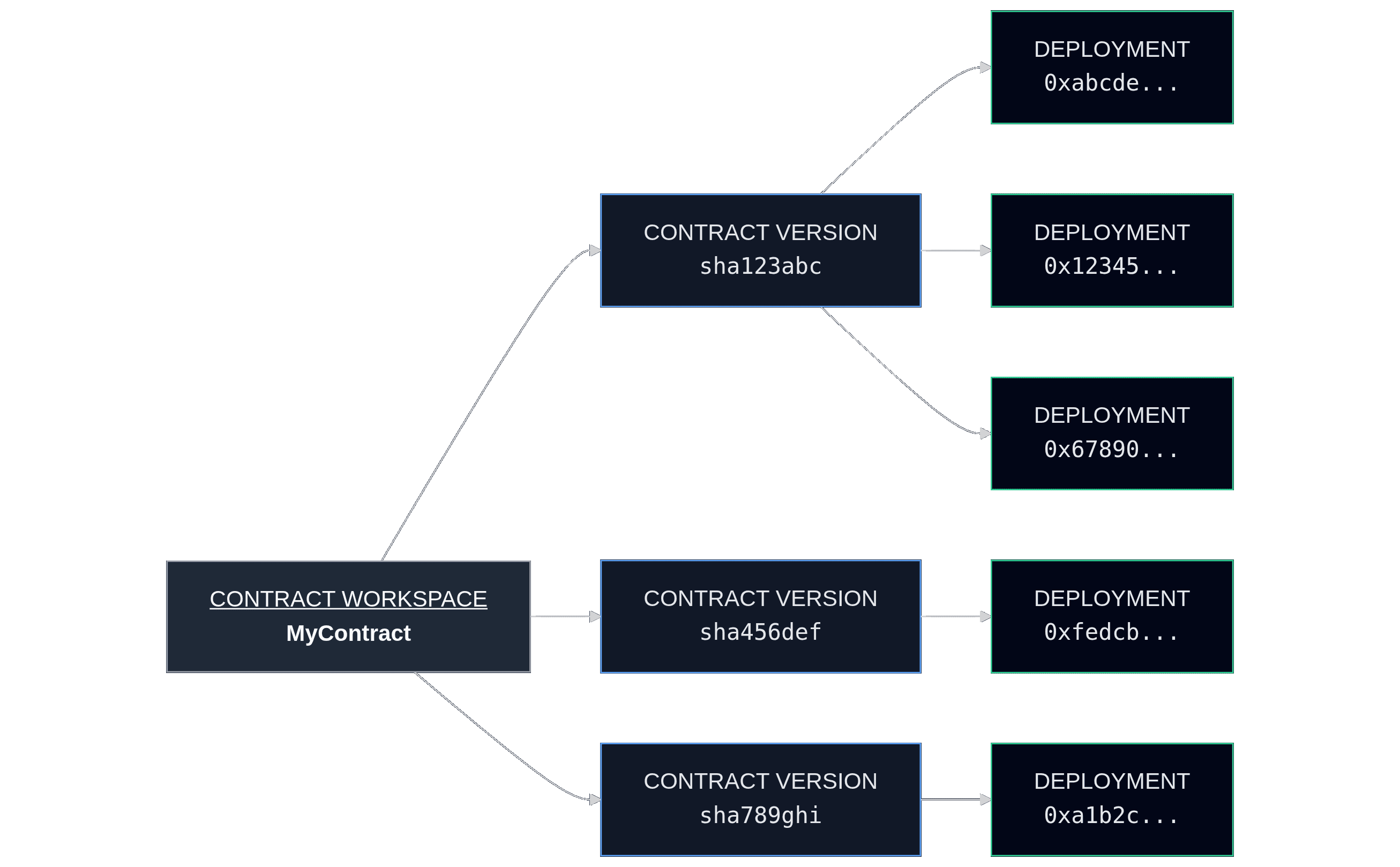
- Contract Version → represents a specific version of a contract’s code
- Contract Deployment → represents an on-chain instance of a Contract Version
- Contract Workspace → groups Contract Versions and Deployments by contract name
This relationship is illustrated below:
To activate a Workspace, you need to have made at least one Deployment of one of its Versions. This provides a deployed contract for it to provide analytics for.
Workspace Integration
A Workspace brings together all versions and deployments of a contract in a single place. These can be viewed in the Workspace’s History View.
At any given time, the Workspace’s analytics are scoped to a specific deployment. You can switch which deployment is being analysed by selecting it in the History section.
Active Deployment
Each Workspace has an Active Deployment, which acts as the canonical deployment for that Workspace across the Stagenet.
Whenever the Workspace’s name is referenced elsewhere in the app — for example, in the address dropdown of the Faucet — it refers to the Workspace’s Active Deployment.
You can set the Active Deployment from the Workspace’s History section.
By default, the Active Deployment automatically follows the most recent deployment of the latest Contract Version. In practice, this means that when you push contract updates and deploy a new version, the Workspace — and all Stagenet tools — will automatically switch to using the new deployment.
If you manually select a different deployment as the Active Deployment, that selection is pinned and will remain active until you change it again.